
Lua io.popen Blocks Nginx's Event Loop: A 150x Throughput Fix
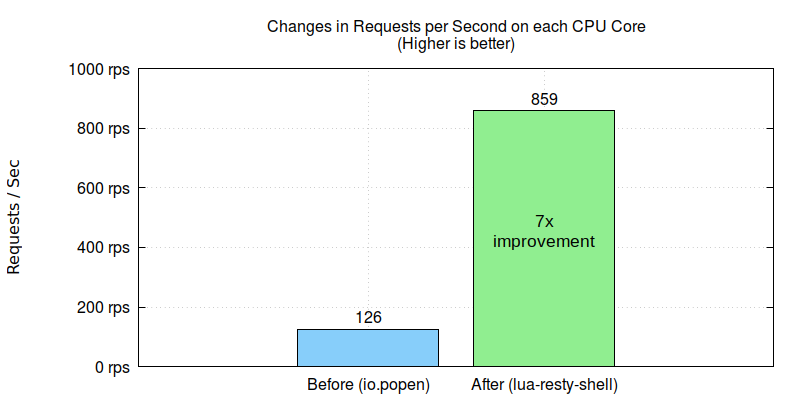
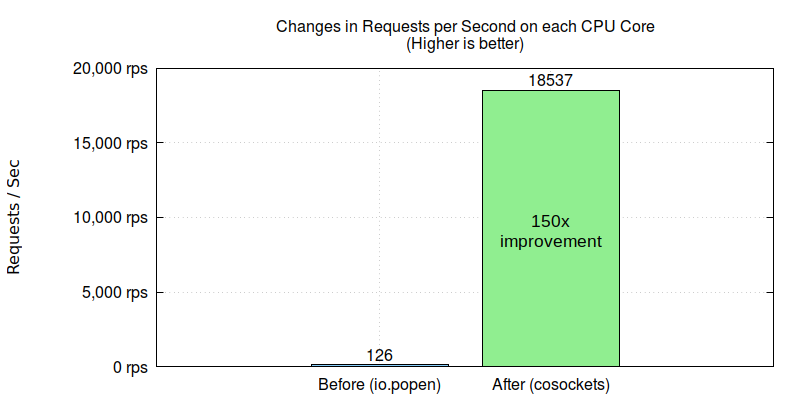
Lua’s io.popen and the read/close operations on its IPC1 pipe handle are synchronous: they block the OpenResty/Nginx event loop in both CPU and off-CPU time, so the worker process cannot execute anything else while it waits. In one production case, OpenResty XRay traced 93.8% of the target process’s CPU time and 99.8% of its off-CPU time to io.popen and the reads on its pipe handle. Switching to OpenResty’s nonblocking lua-resty-shell library yielded almost seven times more throughput; replacing the pipes with nonblocking cosocket calls, 150 times.
Here is how OpenResty XRay found the bottleneck automatically in a web security customer’s production environment, without any code changes or process restarts.
OpenResty XRay is a dynamic-tracing product that automatically analyzes your running applications to troubleshoot performance problems, behavioral issues, and security vulnerabilities with actionable suggestions. Under the hood, OpenResty XRay is powered by our Y language targeting various runtimes like Stap+, eBPF+, GDB, and ODB, depending on the contexts.
The Problem: 130 req/sec with Over Half the CPU Idle
The customer suffers severe performance issues in their online OpenResty application. The maximum number of requests per second served on their servers was very low, merely around 130 req/sec. It is so bad that it rendered their service almost unusable. Furthermore, their Nginx worker processes could only utilize less than half of the CPU resources even though they have high-end CPUs in the servers.
How OpenResty XRay Found the Event-Loop Blocking
OpenResty XRay did quite some deep analyses of the customer’s online processes. It did not require any collaboration from the customer’s applications:
- No extra plugins, modules, or libraries.
- No code injections or patches.
- No special compilation or startup options.
- Not even any need to restart the application processes.
The analyses were done entirely in a postmortem manner. Thanks to the dynamic-tracing technology employed by OpenResty XRay.
This performance problem is easy for OpenResty XRay. It found CPU and off-CPU operations blocking the OpenResty/Nginx event loop together.
CPU Operations: io.popen and file:read() Hotspots
In the diagnostic report automatically prepared by OpenResty XRay, we can see the io.popen and its associated file:close() operations are very hot regarding CPU usage.
io.popen
Under the CPU category, we can find the io.popen issue. It takes 93.8% of the total CPU time consumed by the target process.
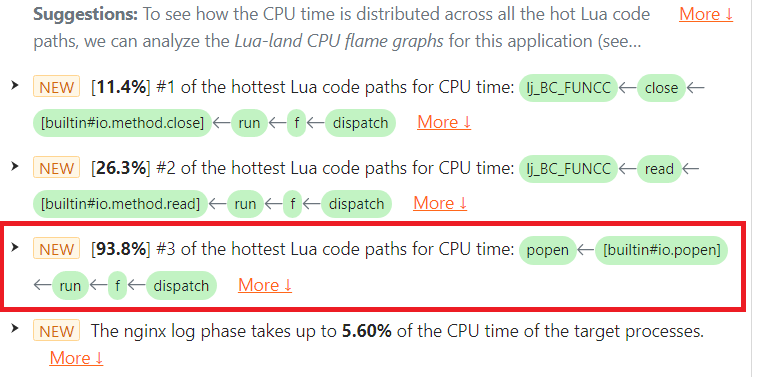
Note the [builtin#io.popen] Lua function frame in the highlighted issue.
The issue text shows the full Lua code path, including the LuaJIT primitives inside the VM, so the user can quickly locate them in their Lua source code. If we hover the mouse cursor over the Lua function run()’s green box, a tooltip pops up with details like the Lua source file name and line number.
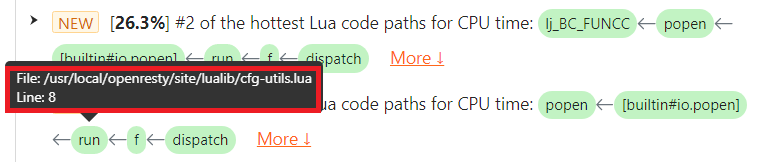
We can see that the location of the io.popen call is at line 8 of the Lua source file /usr/local/openresty/site/lualib/cfg-utils.lua.
file:read()
Under the CPU category, we can find the file:read() issue. It takes 26.3% of the total CPU time consumed by the target process.
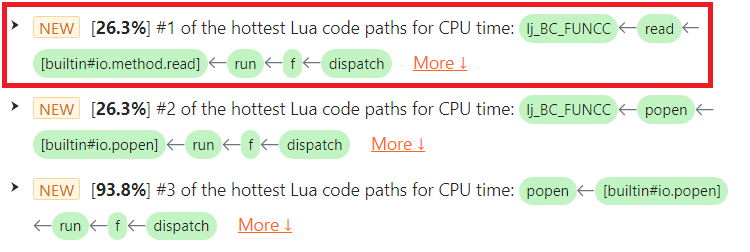
Note the [builtin#io.method.read] function frame in the highlighted issue.
The issue text shows the full Lua code path, including the LuaJIT primitives inside the VM, so the user can quickly locate them in their Lua source code. If we hover the mouse cursor over the Lua function run()’s green box, a tooltip pops up with details like the Lua source file name and line number.
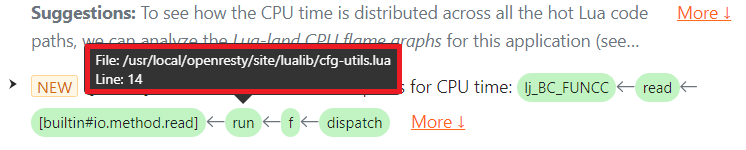
We can see that the location of the file:read() call is at line 14 of the Lua source file /usr/local/openresty/site/lualib/cfg-utils.lua. The customer checked that Lua source line and confirmed that it was upon a file handle opened by the earlier io.popen call.
off-CPU Operations: Where file:read() Blocks and Waits
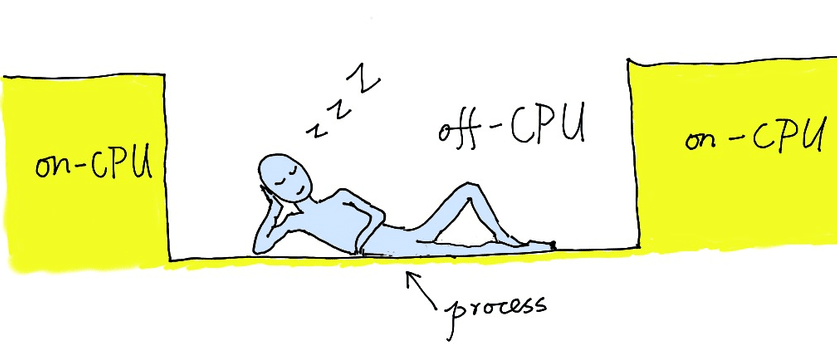
Here the term “off-CPU” means the operating system thread is blocked and waiting for something and cannot execute the following code.
This kind of off-CPU blocking is a classic root cause behind high tail latency. See how we chased one down in pinpointing a 244ms latency spike in a 500k QPS OpenResty gateway. And for the full forensic process of quantifying how badly an event loop is blocked — 43,952 blocking samples in 20 seconds, with a 75ms worst case — see the Nginx worker that refused to serve more than 300 RPS.
file:read()
In the diagnostic report, we saw the file:read() call is very hot in terms of off-CPU time. It takes 99.8% of the total off-CPU time consumed by the target process, while the only thing that should block is the Nginx event loop’s event waiting operation (like the epoll_wait system call).

Note the [builtin#io.method.read] Lua function frame in the highlighted issue.
The issue text shows the full Lua code path, including the LuaJIT primitives inside the VM, so the user can quickly locate them in their Lua source code. If we hover the mouse cursor over the Lua function run()’s green box, a tooltip pops up with details like the Lua source file name and line number.

We can see that the location of the file:read() call is at line 14 of the Lua source file /usr/local/openresty/site/lualib/cfg-utils.lua. The customer checked that Lua source line and confirmed that it was also upon a file handle opened by the earlier io.popen call.
Nonblocking Alternatives to io.popen: lua-resty-shell, ngx.pipe, and Cosockets
According to the analyses above, the culprit is the Lua API for pipes, including io.popen and the reading and closing operations on the pipe file handle. It blocks the Nginx event loop very severely in terms of both CPU and off-CPU time. The solutions are thus also straightforward:
- Avoid the io.popen Lua API in OpenResty applications. Use OpenResty’s lua-resty-shell library or the lower-level Lua API ngx.pipe instead.
- Avoid system commands and IPC pipes altogether. Use the more efficient cosocket API provided by OpenResty or higher-level libraries built on top of it.
Results: 7x with lua-resty-shell, 150x with Cosockets
The customer followed our suggestion and migrated from the standard Lua API, io.popen, to OpenResty’s lua-resty-shell library in their gateway application. They then immediately saw about seven times improvement.
We further suggested they should avoid expensive system commands altogether. They then redesigned the business logic and utilized OpenResty’s nonblocking cosocket API to fetch the meta-data. This change gave 150 times improvement, leading to tens of thousands of requests per second on a single CPU core.
The customer is pleased with the performance now.
Frequently Asked Questions
Why does io.popen block the Nginx event loop?
io.popen and the read and close operations on its pipe file handle are synchronous Lua APIs: the operating system thread blocks and waits, unable to execute anything else, while the only operation that should ever block is the event loop’s own event waiting (such as the epoll_wait system call). In the case above, these calls consumed 93.8% of the process’s CPU time and 99.8% of its off-CPU time.
What should I use instead of io.popen in OpenResty?
Use OpenResty’s nonblocking lua-resty-shell library or the lower-level ngx.pipe API — that alone brought a 7x throughput improvement in this case. Better still, avoid spawning system commands altogether and fetch the data through the nonblocking cosocket API, which yielded a 150x improvement here.
How do I find out whether io.popen is blocking my Nginx worker processes?
OpenResty XRay analyzes running processes automatically — no extra plugins or libraries, no code injection, and no process restarts. Its diagnostic reports show the full Lua code path of each blocking operation, down to the source file name and line number, as with the io.popen call at line 8 of cfg-utils.lua in this case.
About The Author
Yichun Zhang (Github handle: agentzh), is the original creator of the OpenResty® open-source project and the CEO of OpenResty Inc..
Yichun is one of the earliest advocates and leaders of “open-source technology”. He worked at many internationally renowned tech companies, such as Cloudflare, Yahoo!. He is a pioneer of “edge computing”, “dynamic tracing” and “machine coding”, with over 22 years of programming and 16 years of open source experience. Yichun is well-known in the open-source space as the project leader of OpenResty®, adopted by more than 40 million global website domains.
OpenResty Inc., the enterprise software start-up founded by Yichun in 2017, has customers from some of the biggest companies in the world. Its flagship product, OpenResty XRay, is a non-invasive profiling and troubleshooting tool that significantly enhances and utilizes dynamic tracing technology. And its OpenResty Edge product is a powerful distributed traffic management and private CDN software product.
As an avid open-source contributor, Yichun has contributed more than a million lines of code to numerous open-source projects, including Linux kernel, Nginx, LuaJIT, GDB, SystemTap, LLVM, Perl, etc. He has also authored more than 60 open-source software libraries.
IPC stands for Inter-Process Communication. ↩︎
Related Articles
OpenResty XRay Dec 23, 2025

OpenResty XRay Sep 1, 2025

OpenResty XRay Jul 15, 2023

OpenResty XRay Jul 15, 2023

OpenResty XRay Jul 8, 2026