
Building a Self-Hosted Live Streaming CDN for HLS with OpenResty Edge
The core challenge of live HLS delivery is not bandwidth — it is collapsing total origin traffic down to “one fetch per object, network-wide.” In a self-hosted delivery layer built on OpenResty Edge, this is achieved through three mechanisms: separate page rules for playlists and segments (with opposite TTLs), the “Use stale proxy cache” action (which suppresses stale-refresh stampedes and falls back gracefully when the origin fails), and a shield tier built with gateway partitions. The configuration in this article comes from a real production deployment: during a globally watched, top-tier sports broadcast, several OpenResty Edge gateway nodes formed a private CDN that carried a massive concurrent audience at peak, while the expensive GPU transcoding origin behind it only ever had to serve “one fetch per object” — rock solid throughout. And unlike a managed CDN, the entire delivery layer runs on your own infrastructure, with egress costs and the origin-protection strategy fully under your control.
HLS (HTTP Live Streaming) caching looks trivial: it is just HTTP requests for .m3u8 playlists and .ts segments. But live HLS has one property that breaks the naive caching approach — the playlist expires every few seconds, and every single expiry can trigger a request storm that overwhelms the origin (cache stampede / thundering herd). When multiple CDN nodes fetch from the same origin, that pressure multiplies with the node count. Below we go from first principles to configuration, building a delivery layer that genuinely protects the origin.
Why live HLS breaks a naive caching setup
A single HLS live stream consists of two objects with completely different characteristics:
| m3u8 playlist | ts segment | |
|---|---|---|
| URL | Fixed, contents change every few seconds | Every segment is a brand-new URL |
| Cacheability | Extremely short TTL (seconds) | Long TTL (immutable once written) |
| Failure mode | Origin storm at the moment of expiry | Origin storm on cold-start fetch |
The playlist’s stale refresh is the most easily overlooked risk. An nginx-style cache lock only deduplicates the creation of a new cache entry; it does not serialize the refresh of an expired entry. And a live playlist expires every few seconds by design — under the real concurrency of a massive audience, every expiry can send hundreds of requests to an origin that should only ever handle a handful.
This risk is amplified dramatically in a multi-node architecture. In production you typically have multiple CDN / edge nodes fetching from the same origin: with N edge nodes, each leaking a burst of origin fetches at the moment of expiry, the origin absorbs N times the storm. Once the origin’s link saturates, it enters a self-amplifying spiral — random packet loss, slower fetches, timeouts releasing yet more requests — until every node and every viewer’s stream collapses together.
In other words: what decides whether the system survives is not any single node’s bandwidth ratio, but whether the total origin traffic is strictly held within the origin’s capacity. Every bit of lost cache deduplication multiplies origin pressure by the node count and the audience size.
The configuration goals, therefore, are:
- On every playlist refresh, no matter how many viewers, each node is allowed exactly one origin fetch.
- For each new segment, each node is allowed exactly one origin fetch.
- When the origin slows down or goes down, serve stale content as a fallback instead of stampeding the origin or returning errors.
- When there are many nodes, add a shield (parent) cache to further collapse “once per node” into “once network-wide.”
Let’s implement each of these in OpenResty Edge. OpenResty Edge manages everything — Applications, Upstreams, Page Rules — through its Admin console, and configuration changes are pushed to the gateway nodes with no reload or restart, which is very convenient for tuning a live system online.
Step 1: Create an upstream pointing to the HLS origin
Under the application, define an upstream pointing to the HLS origin (the packager or transcoder). If you have a backup origin, add it as well.
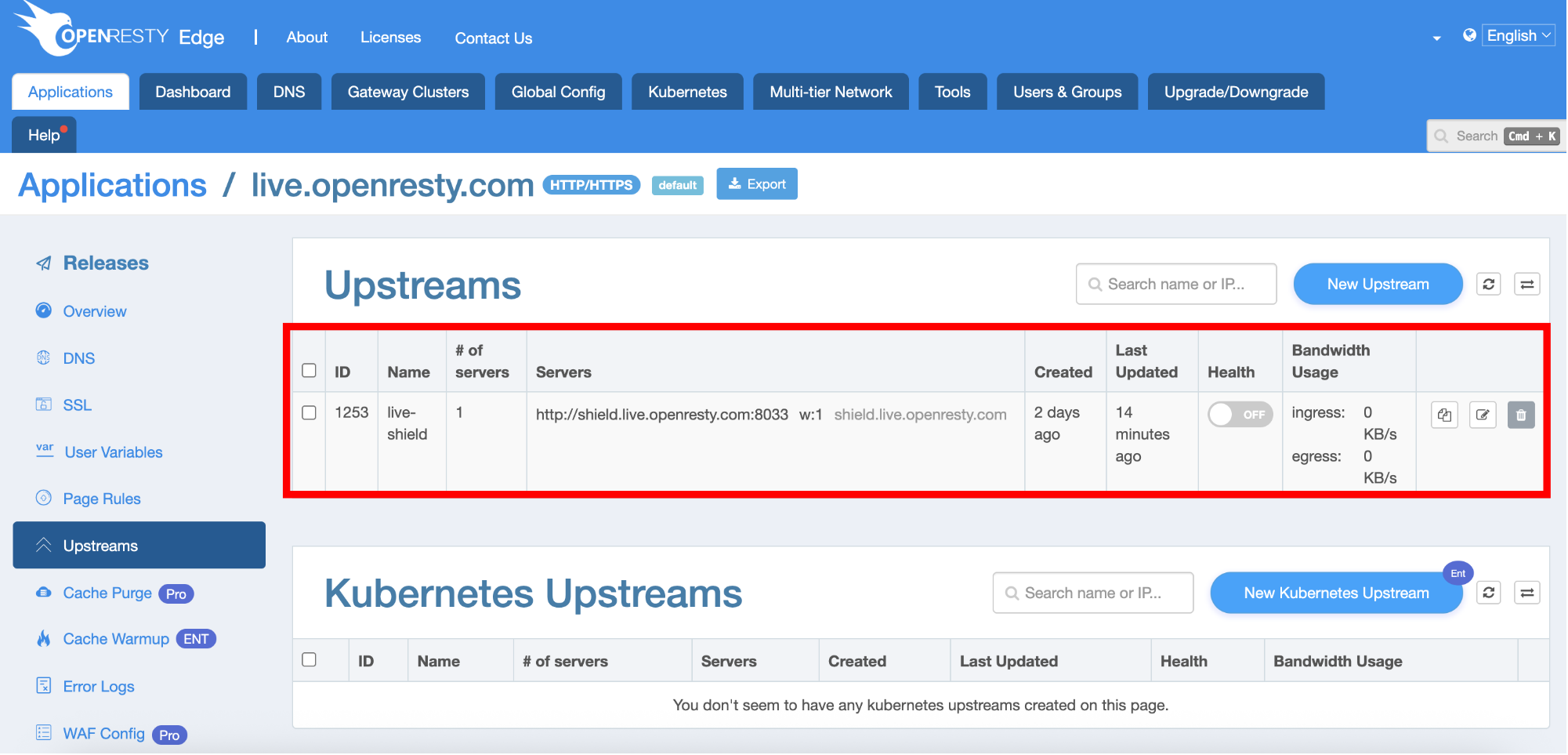
Here is a UI-independent, evergreen capacity tip: treat the origin’s capacity as a tight, network-wide shared budget. The estimate is simple: origin link bandwidth ÷ per-segment fetch rate ≈ the concurrent origin-fetch ceiling the origin can sustain. Note that this ceiling is shared by all edge nodes — ten nodes each “only fetching a few extra times” become dozens of times the pressure once aggregated at the origin. Make sure the expected total concurrent origin fetches network-wide stays well below this ceiling; with the caching strategy below, steady-state origin traffic should be nothing more than “one copy per object, per node.”
Step 2: Create separate page rules for playlists and segments
Because playlists and segments need opposite caching strategies, create one page rule for each:
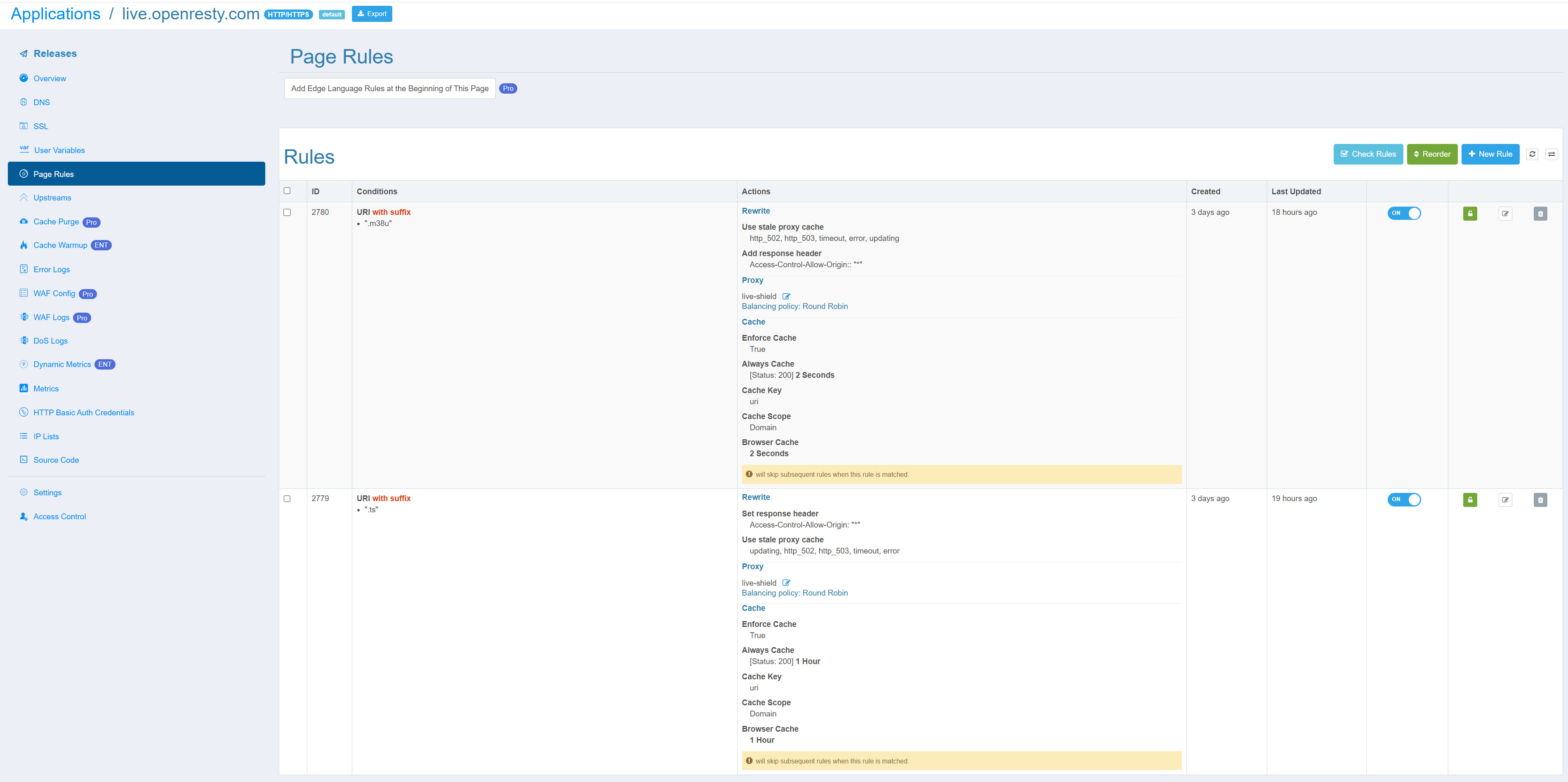
Rule 1 — playlist. Condition (Enable when): set Variable to URI, Operator to Suffix matches, and Value to the playlist’s extension (the screenshots in this article use a custom extension .m38u; standard HLS naming is .m3u8 — use whatever your actual stream uses).
Rule 2 — segment. Condition: URI suffix matches .ts (if you deliver fMP4/CMAF, use “Add more value” to append .m4s, .mp4). This rule also needs an action: Set response header Access-Control-Allow-Origin: "*" — required for browser players (hls.js, etc.) to fetch across origins. Just add one response-header action in OpenResty Edge; no origin change needed.
Both rules point to the same upstream with a Round Robin balancing policy, and both have “Skip any subsequent page rules when this rule matches” checked at the bottom — match and stop, so no later rule accidentally overrides the caching strategy.
Step 3: Proxy and retry settings
Open the rule editor and, in the Proxy block, select the upstream. The key items in the production configuration:
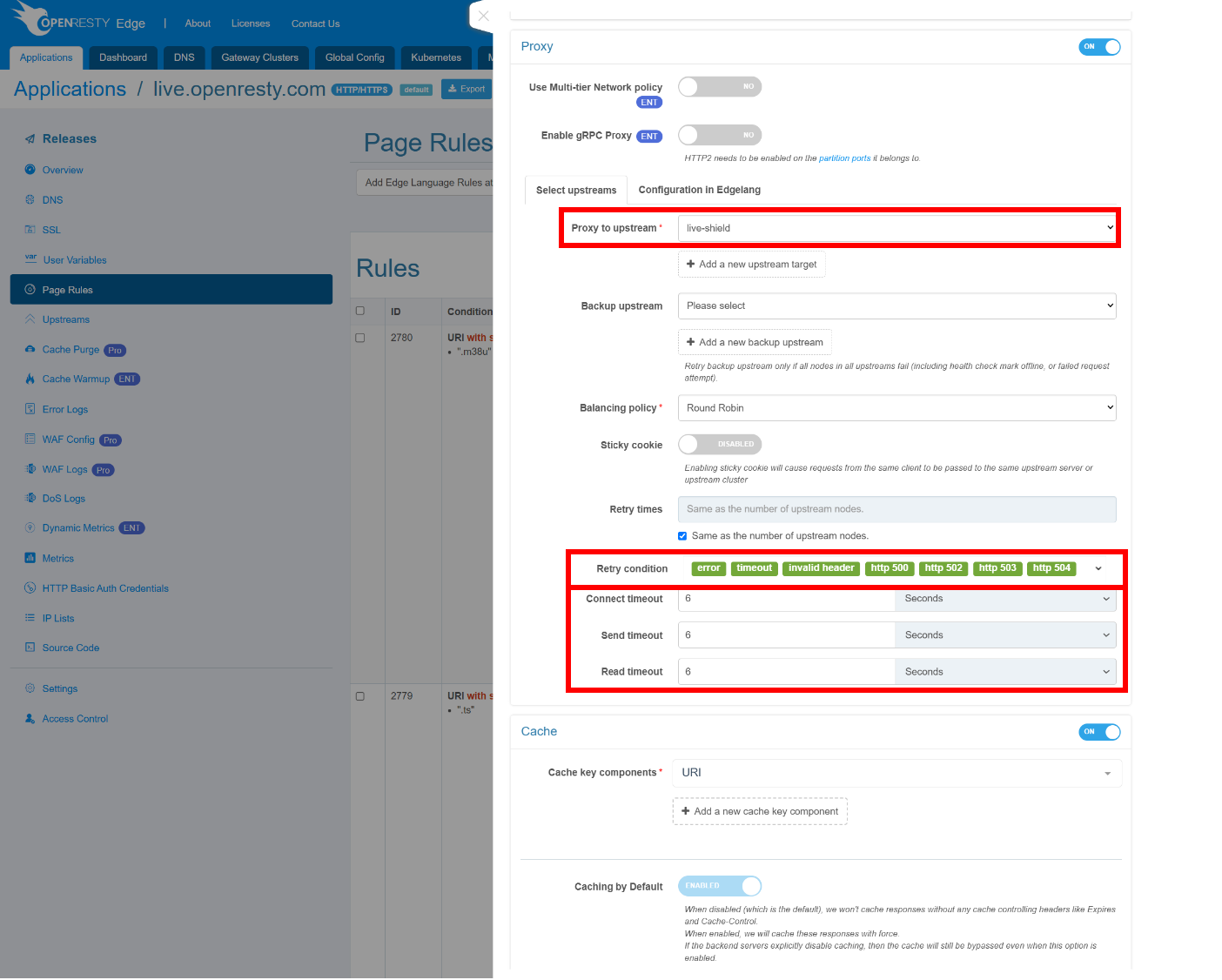
- Proxy to upstream: select the upstream created in Step 1; you can configure a backup upstream via “Add a new backup upstream” (it only engages when all primary upstream nodes have failed).
- Retry times: check “Same as the number of upstream nodes” so the retry count automatically equals the number of upstream nodes.
- Retry condition:
error, timeout, invalid header, http 500, http 502, http 503, http 504— when a single node’s fetch fails, retry another node immediately rather than throwing the error straight to the player. - Connect / Send / Read timeout: 6 seconds each. For live streaming these should not be too long — the shorter the timeout, the faster the failover; 6 seconds is a safe starting point, and if the origin responds reliably you can push the connect timeout further down to 2–3 seconds.
Step 4: Cache settings
Turn on the Cache switch in the rule editor and configure each item:
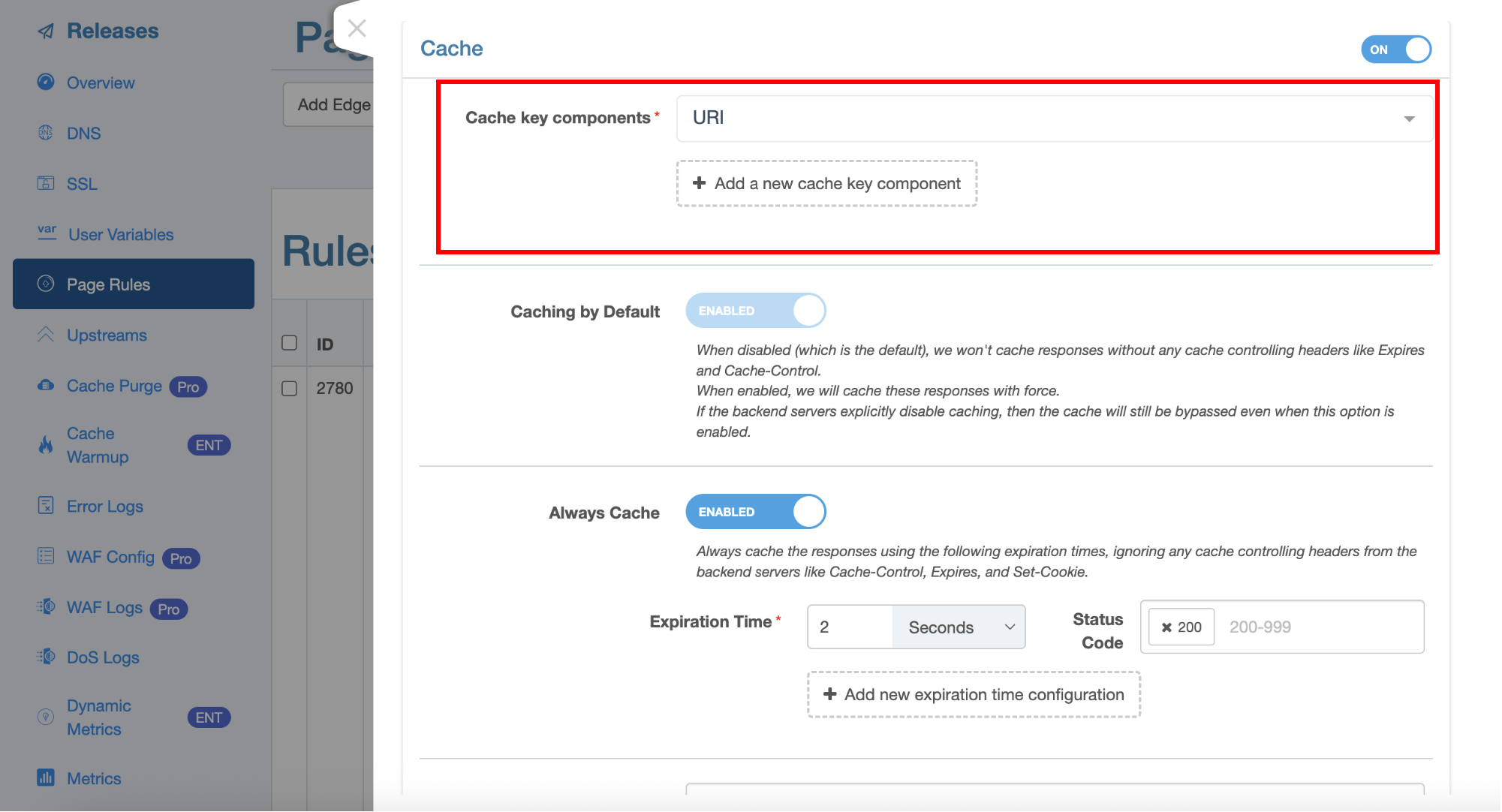
Cache key components: URI + Query string. This is the default combination; whether you keep Query string depends on your URL shape. If the player appends per-viewer query parameters (auth token, session ID, timestamp), you must delete the Query string component (click the × to the right of the component) — otherwise every viewer gets its own cache key and the hit ratio silently drops to zero: a thousand viewers requesting the same segment become a thousand origin fetches. Do authentication with a separate access rule instead. The symptom of getting this wrong is obvious in the logs: the same file MISSing over and over, differing only by query string. The stream URLs in this example carry no volatile parameters, so the default is fine.
Caching by Default: ENABLED. When the origin sends no Cache-Control/Expires, the gateway does not cache by default; enabling this caches such responses too.
Always Cache: ENABLED — ignore the origin’s cache-control headers and force caching by the expiration time set here. This is the recommended practice for live streaming, with the TTL entirely under the gateway’s control:
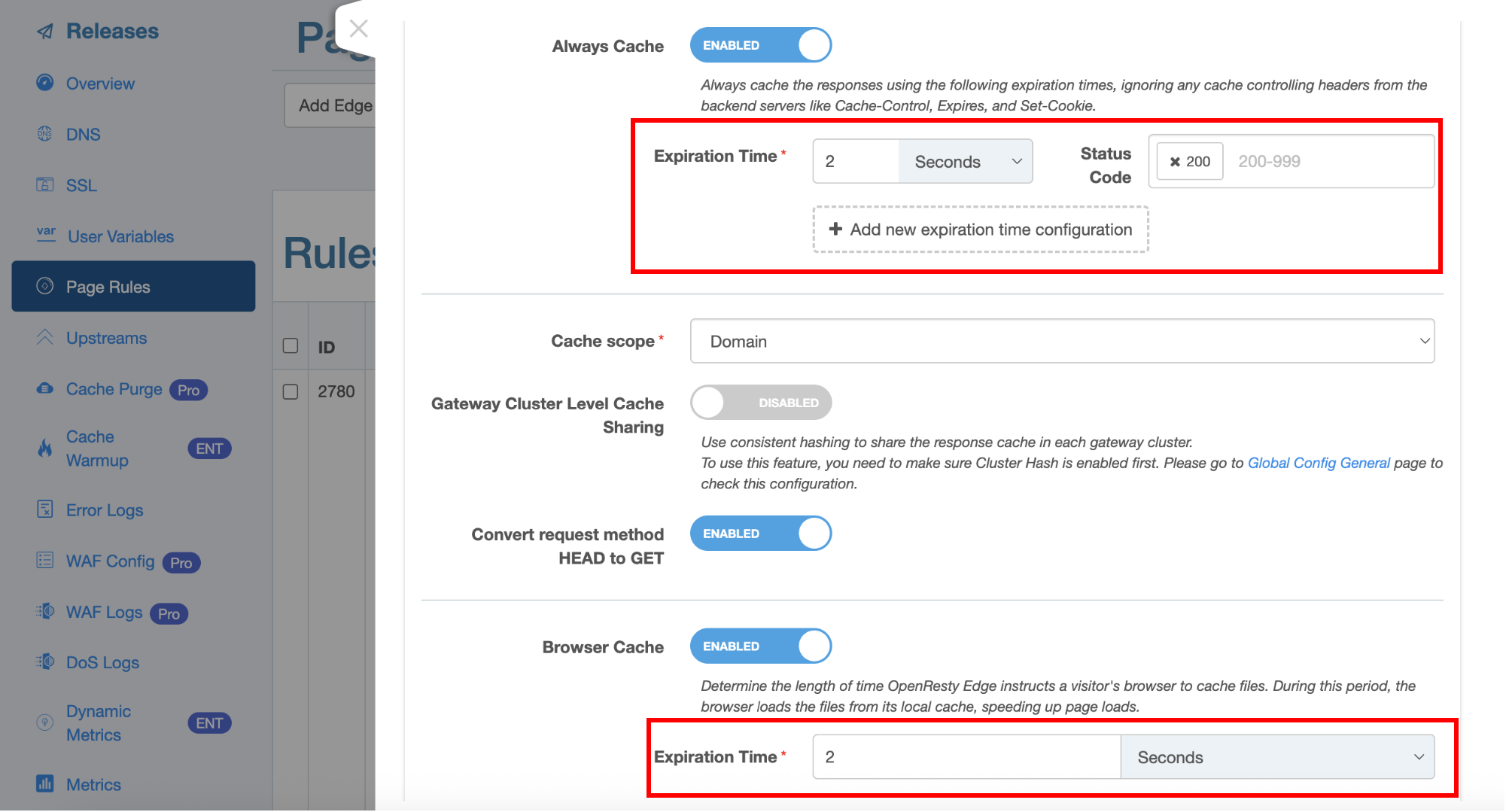
- Playlist rule: Expiration Time 2 seconds, Status Code 200 only (about half the segment duration; segments in this example are ~3–4 seconds).
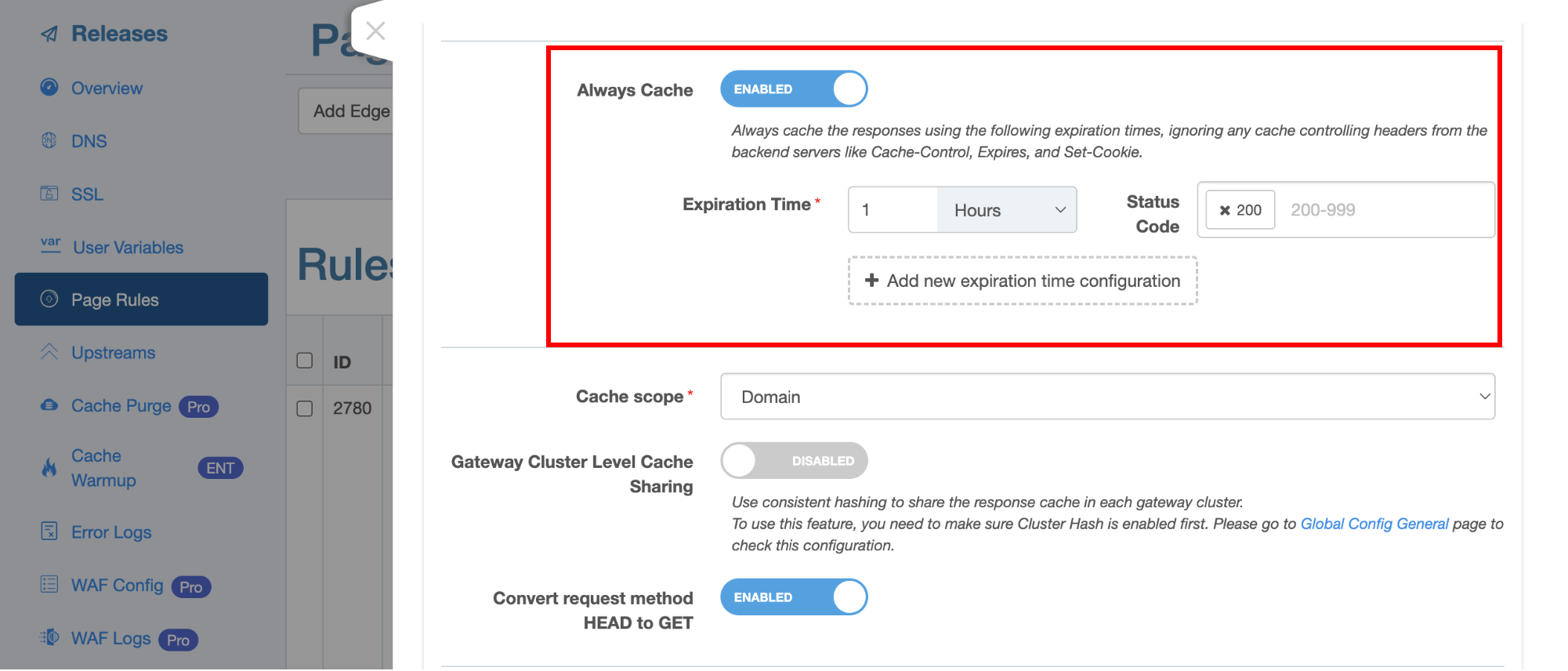
- ts segment rule: Expiration Time 1 hour, Status Code 200 only. A segment is immutable once written, so in theory it could be cached far longer; one hour is more than enough for live.
Note that the Status Code field holds 200 only — never add 5xx, or a single origin failure gets cached and keeps being served to everyone even after the origin recovers.
The two screenshots below show the actual expiration-time configuration for the playlist rule (2 seconds) and the ts segment rule (1 hour):
Cache scope: Domain (isolate the cache per domain).
Browser Cache: ENABLED, with expiration aligned to the gateway cache — 2 seconds for the playlist, 1 hour for segments. Letting the viewer’s browser cache briefly too further cuts repeated requests to the edge nodes.
Convert request method HEAD to GET: ENABLED, so HEAD probe requests don’t bypass the cache.
Step 5: Add the “Use stale proxy cache” action — the most critical step
This is the most important, and most easily missed, setting for live HLS. In OpenResty Edge it is simply an action inside a page rule: click “Add a new action”, choose “Use stale proxy cache”, then check the following under “Use in the following cases”:
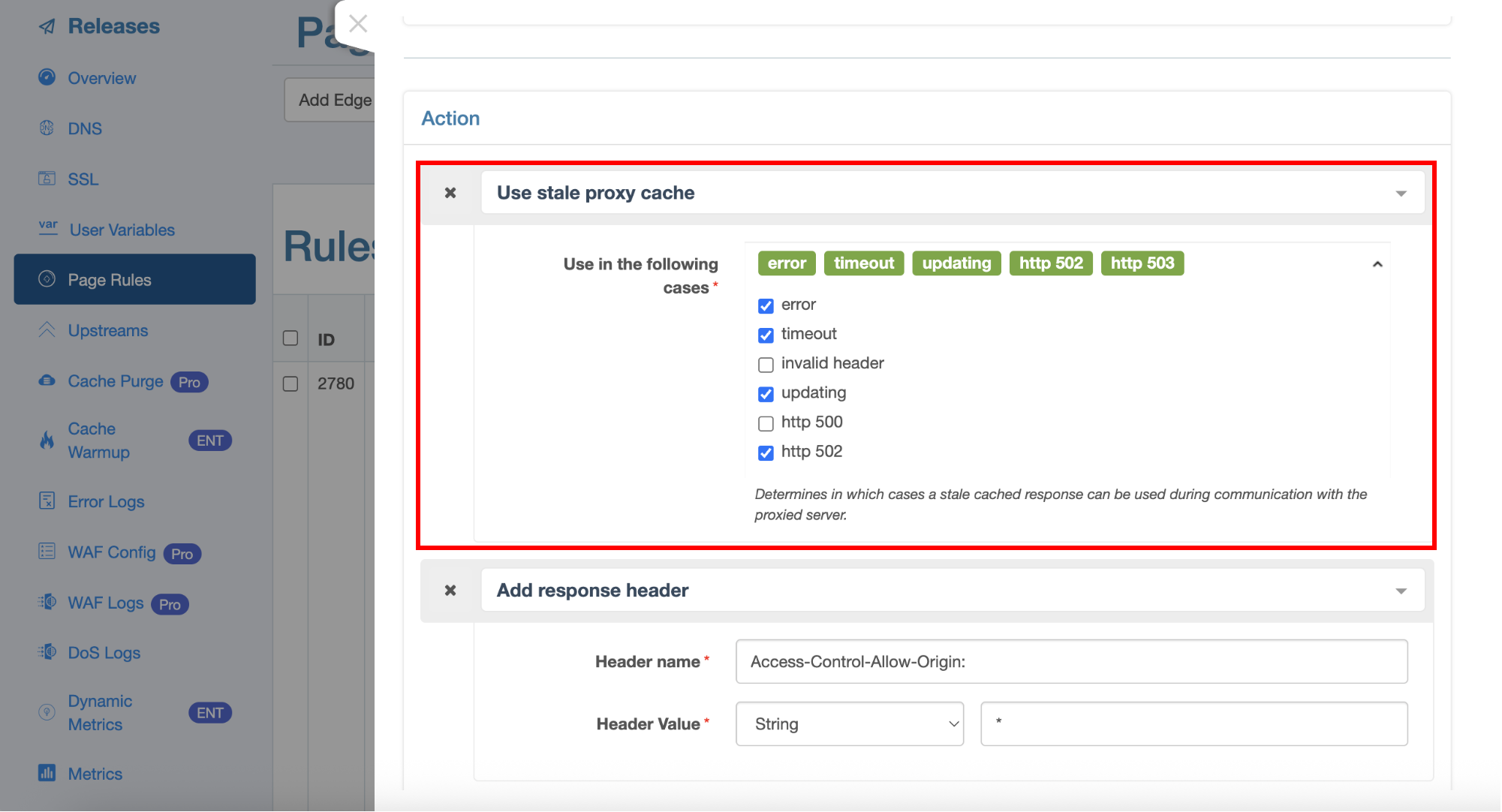
- ✅ updating — this covers the playlist’s every-2-to-3-seconds stale refresh: while one request goes to the origin to refresh, all other requests immediately get the slightly stale old copy;
- ✅ error, timeout — fall back on the old content when the origin connection fails or times out;
- ✅ http 502, http 503 — when the origin returns an error, fall back on the last successful response as well, instead of passing the error through to the player.
Why is updating so critical? As noted above, a cache lock only deduplicates the creation of a new cache entry; it does not serialize the refresh of an expired entry. And a live playlist expires every few seconds by design — without this option, every expiry can trigger an origin storm, and since the lock is scoped to a single node, the leaks from multiple nodes stack directly on the origin. With updating checked, each refresh cycle triggers exactly one origin fetch per node.
Once enabled, origin failures also degrade gracefully: viewers keep receiving the last playlist, the player parks at the live edge and keeps polling, and playback resumes seamlessly once the origin recovers — instead of every player erroring out at once.
Both rules (playlist and segment) should have this action added. Segments are brand-new URLs and usually have no old copy to fall back on, but the action still has fallback value for repeatedly requested segments and for transient origin jitter; what really backstops segments is the retry mechanism from Step 3 (retry condition + backup upstream).
While we are here, let’s clear up two things that are often confused:
- Caching 5xx (wrong): including error codes in Always Cache’s Status Code stores the error page in the cache and keeps serving it — Step 4 already stressed 200 only.
- Serving stale cache on 5xx (right): checking http 502/503 in “Use stale proxy cache” serves the last successful response when the origin errors.
One implicit prerequisite: stale-cache fallback only works while the expired object is still on disk. Cache expiry is not deletion — expired files are evicted by the cache zone’s capacity policy, not the moment their TTL passes, which is exactly why the stale mechanism can work.
Step 6: Multi-node architecture — build a shield tier with gateway partitions
Everything above is scoped to a single gateway node: the cache lock and stale-cache fallback collapse each node’s origin fetches to “once per object.” But as the number of edge nodes grows, the origin still sees “node count × once per object” — for an object like the playlist that refreshes every few seconds, the aggregate polling pressure of dozens of nodes is still significant, and any single node’s configuration regression (say, a node that forgot to configure stale-cache reuse) is exposed directly to the origin.
OpenResty Edge’s gateway partition mechanism naturally solves this. In OpenResty Edge, a partition is a grouping of gateway clusters, and each partition can independently publish a different application configuration. Using this, you can directly build a two-tier (shield / parent) cache architecture — which is also the general approach when building a private CDN network:
Viewers ──> edge partition (N clusters / nodes)
              ──> shield partition (a small cluster near the origin)
                        ──> GPU transcoding origin
The concrete steps:
- Create the shield partition: on the Gateway Clusters page, create a new gateway cluster deployed in the same data center as (or adjacent to) the origin, and put it in a dedicated partition (e.g.
shield-partition). - Publish a “back-to-origin application” to the shield partition: its upstream points to the real origin, and its page rules are configured exactly as in the first five steps of this article (split rules, cache key, TTL, stale-cache fallback).
- Change the edge partition’s upstream: the viewer-facing edge application’s upstream no longer points to the origin, but to the shield partition’s nodes.
- Both application configurations are managed and published in the same OpenResty Edge Admin console, with no node reload.
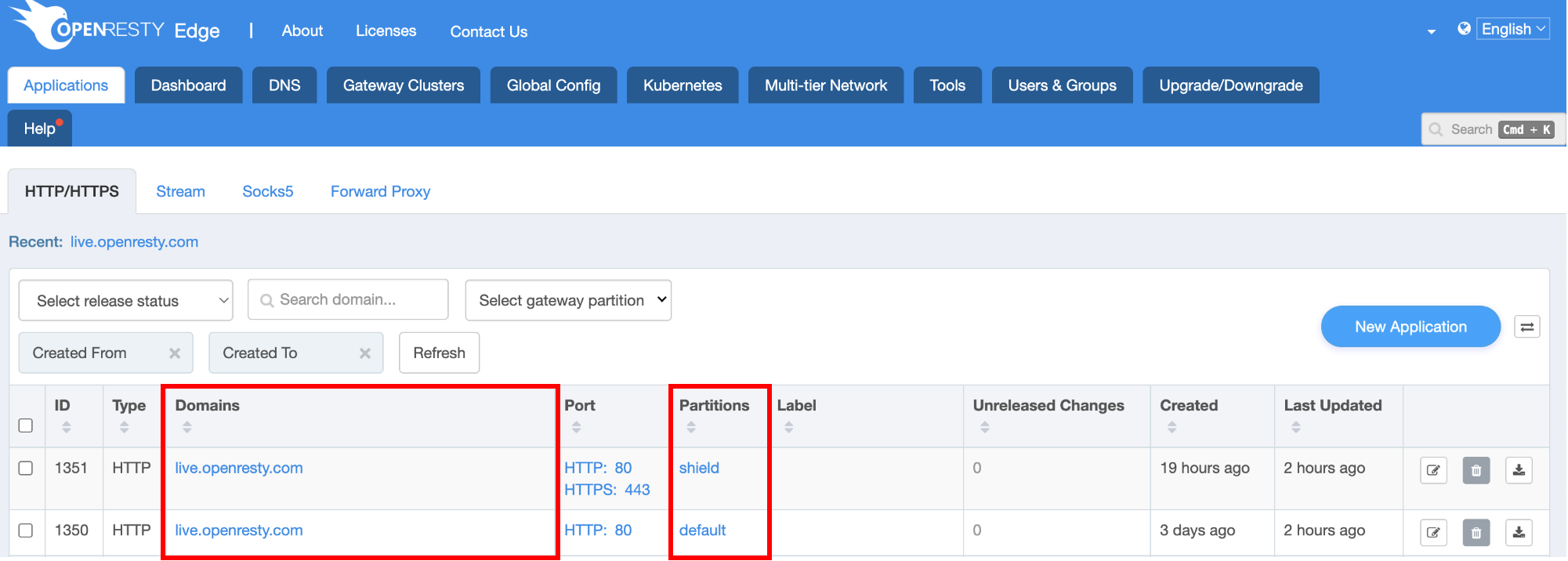
This way, no matter how many edge nodes there are, the origin receives only one fetch network-wide per object. The shield tier is also a natural “configuration breakwater”: even if some edge node experiences a stampede, the storm is absorbed by the shield’s cache and deduplication and never reaches the fragile transcoding origin. In addition, the Proxy block of the rule editor has a “Use Multi-tier Network policy” switch (an Enterprise feature) for organizing the back-to-origin path by multi-tier network policy, which can be combined with the partition architecture.
Also, in the Cache block you will see a “Gateway Cluster Level Cache Sharing” switch: when enabled, consistent hashing keeps the same resource always landing on the same node within a cluster, and that node holds the cache while the other nodes in the cluster fetch from it rather than each going back to the origin (you must first enable Cluster Hash on the Global Config General page). This further collapses origin traffic within a single cluster, and is a complementary second layer of collapse alongside the partition-level parent architecture.
Verifying the configuration
Push the change (OpenResty Edge propagates the configuration to the gateway nodes with no reload), then test from a client:
# Playlist: MISS on the first request, then HIT within ~2 seconds; STALE/UPDATING
# appears on each expiry refresh — you should never see a run of MISSes
curl -sI https://your-edge-domain/live/stream.m3u8 | grep -i cache

# Segment: exactly one MISS per segment, then HIT for the next hour
curl -sI https://your-edge-domain/live/seg-1001.ts | grep -i cache
Before going live, use srs-bench to simulate real HLS player behavior (polling the playlist + downloading segments) for a round of load testing:
# Simulate 2000 concurrent HLS players
docker run --rm -it --network=host ossrs/srs:sb \
  ./objs/sb_hls_load -c 2000 \
  -r https://your-edge-domain/live/test-channel.m3u8
During the test, watch the number of origin requests at the moment of playlist expiry and diagnose by pattern:
- Healthy: regardless of audience size, the origin sees ~1 request per playlist refresh cycle and ~1 request per new segment.
- Stale-refresh stampede: a burst of origin requests on every playlist cycle → the
updatingcase of “Use stale proxy cache” is not in effect. - Cache-key fragmentation: the same object fetched repeatedly with different query strings → fix the cache key.
- Timeout cascade: origin requests rise rather than fall while the origin is slow → check the stale-cache fallback for the error/timeout cases, and shorten the connect timeout.
Finally, deliberately kill the origin for 30 seconds mid-stream. The player should park at the live edge and then recover — not error out.
Summary
The mental model for running live HLS on OpenResty Edge:
- Create separate page rules for playlists and segments — the two need opposite TTLs (in this example: 2 seconds for playlists, 1 hour for segments), and check “skip subsequent rules on match”.
- Guard the cache key against volatile query strings — key fragmentation silently destroys deduplication; when the URL has no volatile parameters, the default URI + Query string is fine.
- The “Use stale proxy cache” action is the core mechanism, not the cache lock — be sure to check
updating(stale-refresh deduplication) anderror/timeout/http_502/http_503(failure fallback); the lock only covers cold-start fetches, and only stale can stop the playlist’s stale-refresh stampede. - Put 200 only in Always Cache’s status codes — rely on stale to serve old content when the origin errors, but never cache the error itself; back the segment tier with a retry condition and a backup upstream.
- Treat the origin’s capacity as a tight, network-wide shared budget — verify in load testing that each node makes exactly one origin fetch per object; origin pressure equals per-node leakage times the node count, so a broken deduplication path is not just a performance regression but a trigger for a self-amplifying avalanche.
- Once you have many nodes, build a shield tier with partitions — collapse “once per node” into “once network-wide”; cluster-level cache sharing (Gateway Cluster Level Cache Sharing) collapses another layer within a cluster.
Get these right, and a compute-expensive transcoding origin can comfortably sustain a large-event audience — the growth happens only at the edge, and the origin only ever sees “one copy per object.” This is exactly the value of using OpenResty Edge to build a private CDN for live delivery.
FAQ
How long should a live HLS playlist be cached?
A safe rule of thumb is about half the segment duration: with 3–4 second segments, set the playlist TTL to 2 seconds. Too long a TTL makes viewers see a lagging live edge; too short increases the refresh frequency. Combined with the updating option of “Use stale proxy cache” — one origin fetch per node per refresh cycle — the TTL choice then only affects live latency, no longer origin pressure.
Why can’t a cache lock stop the stampede in a live scenario?
A cache lock (proxy cache lock) only serializes concurrent origin fetches for a new cache entry; it does not apply to the refresh of an expired entry. In a VOD scenario objects are written once and stay valid for a long time, so the lock is sufficient; a live playlist expires every few seconds, and each expiry is a concurrent refresh the lock cannot govern — this must be deduplicated by the stale-while-updating mechanism.
Is the configuration different for fMP4/CMAF streams (.m4s segments)?
Just append .m4s, .mp4 to the segment rule’s URI suffix match; the caching strategy is identical to .ts (immutable, long TTL). The playlist (.m3u8) strategy is unchanged too.
Should I use a managed CDN or self-host the delivery layer for live streaming?
For a small audience or a one-off event, a managed CDN is the path of least resistance. The economics flip as the audience grows: managed egress fees scale linearly with viewer count, while a self-hosted delivery layer’s capacity is largely a fixed cost — we walk through the full decision framework in choosing a CDN for live streaming — and the origin-protection behavior (stale policies, shield tiers, cache keys) is fully under your control instead of being a vendor black box. Note that self-hosting does not mean assembling everything from scratch: OpenResty Edge is commercial self-hosted software — the gateway nodes run on your own machines, and everything is managed from a single console.
How many edge nodes make a shield partition worthwhile?
There is no hard threshold; the deciding factor is the origin budget. The origin sees a steady-state fetch volume of roughly “node count × once per object.” When the playlist’s aggregate polling frequency (node count ÷ TTL) starts to approach what the origin can comfortably handle, or when you want the fault-tolerance value of a “configuration breakwater,” a shield tier is worth it — in OpenResty Edge it is just one more partition and one more back-to-origin application, at very low cost.
About OpenResty Edge
OpenResty Edge is an all-in-one gateway software product designed for microservices and distributed traffic architectures, developed in-house by us. It combines traffic management, private CDN building, API gateway, and security protection into one product, helping you easily build, manage, and secure modern applications. OpenResty Edge offers industry-leading performance and scalability, meeting the demanding requirements of high-concurrency, high-load scenarios. It can schedule traffic for containerized applications such as K8s and manage massive numbers of domains, easily meeting the needs of large websites and complex applications.
If you like this tutorial, please subscribe to this blog site and/or our YouTube channel. Thank you!
About The Author
Yichun Zhang (Github handle: agentzh), is the original creator of the OpenResty® open-source project and the CEO of OpenResty Inc..
Yichun is one of the earliest advocates and leaders of “open-source technology”. He worked at many internationally renowned tech companies, such as Cloudflare, Yahoo!. He is a pioneer of “edge computing”, “dynamic tracing” and “machine coding”, with over 22 years of programming and 16 years of open source experience. Yichun is well-known in the open-source space as the project leader of OpenResty®, adopted by more than 40 million global website domains.
OpenResty Inc., the enterprise software start-up founded by Yichun in 2017, has customers from some of the biggest companies in the world. Its flagship product, OpenResty XRay, is a non-invasive profiling and troubleshooting tool that significantly enhances and utilizes dynamic tracing technology. And its OpenResty Edge product is a powerful distributed traffic management and private CDN software product.
As an avid open-source contributor, Yichun has contributed more than a million lines of code to numerous open-source projects, including Linux kernel, Nginx, LuaJIT, GDB, SystemTap, LLVM, Perl, etc. He has also authored more than 60 open-source software libraries.
Translations
We provide the Chinese version of this article. We also welcome readers to contribute translations in other languages. As long as it is a full translation without omissions, we will consider adopting it. Thank you very much!
Related Articles
OpenResty XRay Apr 12, 2021

OpenResty XRay Apr 3, 2021

OpenResty XRay Apr 10, 2024

OpenResty XRay Jun 5, 2023

OpenResty XRay May 29, 2023