
OpenResty Edge Database Backup and Failover: Why Replication Is Not a Backup
In April 2026, the SaaS platform PocketOS experienced an unprecedented “technical black swan”: an internal AI coding agent trying to auto-fix errors accidentally invoked a globally privileged API and wiped its entire production database in just 9 seconds. Worse still, because backups lived on the same volume as the primary data, recent backups were destroyed along with it.
The incident is a wake-up call for every team: in a highly automated world, damage often strikes in milliseconds and is impossible to predict. For gateway systems running in production, data security is easy to postpone but must not be neglected. OpenResty Edge stores all traffic routing rules, security policies, and application configuration in a database—the same store behind every config release and rollback. Those items are operational assets your team has accumulated over time; they cannot be reverse-engineered from business systems alone. If the database is damaged beyond recovery, you must rebuild every gateway rule from scratch.
OpenResty Edge addresses this risk with three layers of data protection, covering the full spectrum from basic scheduled backups to fully automatic failover. The layers complement each other; teams can choose a combination suited to their availability needs.
In short: streaming replication and automatic failover keep the gateway online through hardware failure, but they replicate mistakes too—an accidental or malicious DROP DATABASE reaches every standby in the same instant. Only scheduled backups kept on a different host can roll the database back to a moment before the damage. Treat off-host backups as the non-negotiable baseline and layer replication and failover on top for availability.
First line of defense: scheduled database backups and off-host sync
This is the baseline every deployment should configure. OpenResty Edge provides dedicated backup scripts for two core databases: Edge Admin DB (the core database that stores all application configuration) and Edge Log Server DB (logs and statistical metrics). Scripts can be run manually or scheduled via crontab for unattended periodic backups.
Backup files can be written to a local directory and optionally synced to a remote host with rsync. Two practices deserve emphasis:
- The local backup directory should be on different physical disks than the database, or one disk failure can take out both live data and backups.
- Enable remote sync (strongly recommended): local files alone can still be lost; off-host storage is what achieves real isolation.
Scripts support retention rotation—parameters control how many backups to keep, and the oldest are removed automatically to cap disk usage.
To restore: unpack the backup and import the SQL with psql for a full restore. See the official documentation for step-by-step instructions.
Be transparent about limits: scheduled backups have an inherent time window—changes between two backup runs cannot be recovered this way, and the Edge Admin is briefly down during a restore (the gateway nodes keep serving traffic on their last published configuration meanwhile). That is the limit of this approach and why the next layer of defense exists.
Second line of defense: does streaming replication protect against accidental deletion?
Short answer: no—not on its own. Streaming replication keeps a standby in near real time so you can survive a primary failure, but it faithfully copies every change, including mistaken and malicious ones. It raises availability; it does not give you point-in-time recovery.
When business requirements for service continuity are explicit, scheduled backups alone are not enough. Primary–standby streaming replication, built on top of that baseline, raises failure-recovery capability by another order of magnitude.
The design uses PostgreSQL native streaming replication in a primary–standby layout. The standby applies changes from the primary in near real time. If the primary fails, you can promote the standby to accept reads and writes. Compared with a full restore from backup, switchover can finish within minutes.
OpenResty Edge ships an interactive setup script that turns what used to mean hand-editing multiple PostgreSQL configuration files into a guided Q&A: you supply node addresses, data directories, and replication users, and the script applies configuration and restarts services. After setup, query the pg_stat_replication view to verify that replication is healthy and correctly established.
Streaming replication is not a substitute for scheduled backups. Replication forwards every change, including mistakes, to the standby; you cannot rewind to an arbitrary past point in time. Scheduled backups keep multiple historical snapshots. The two solve different problems on different dimensions and should be used together.
The limitations of this approach are that failover requires human intervention and that, after promotion, you must manually update application database connection settings. Where you need to reduce manual steps further, the third layer offers a more complete answer.
Third line of defense: automatic database failover cluster
For environments with the most demanding availability requirements—your most critical business workloads—OpenResty Edge provides a high-availability database cluster management tool that advances failure recovery into an automated phase.
It extends primary–standby with a dedicated monitor node. The monitor continually checks data-node health; when the primary fails, it promotes a standby automatically with no human intervention. A cluster consists of one monitor and two or more data nodes (one primary and one or more standbys).
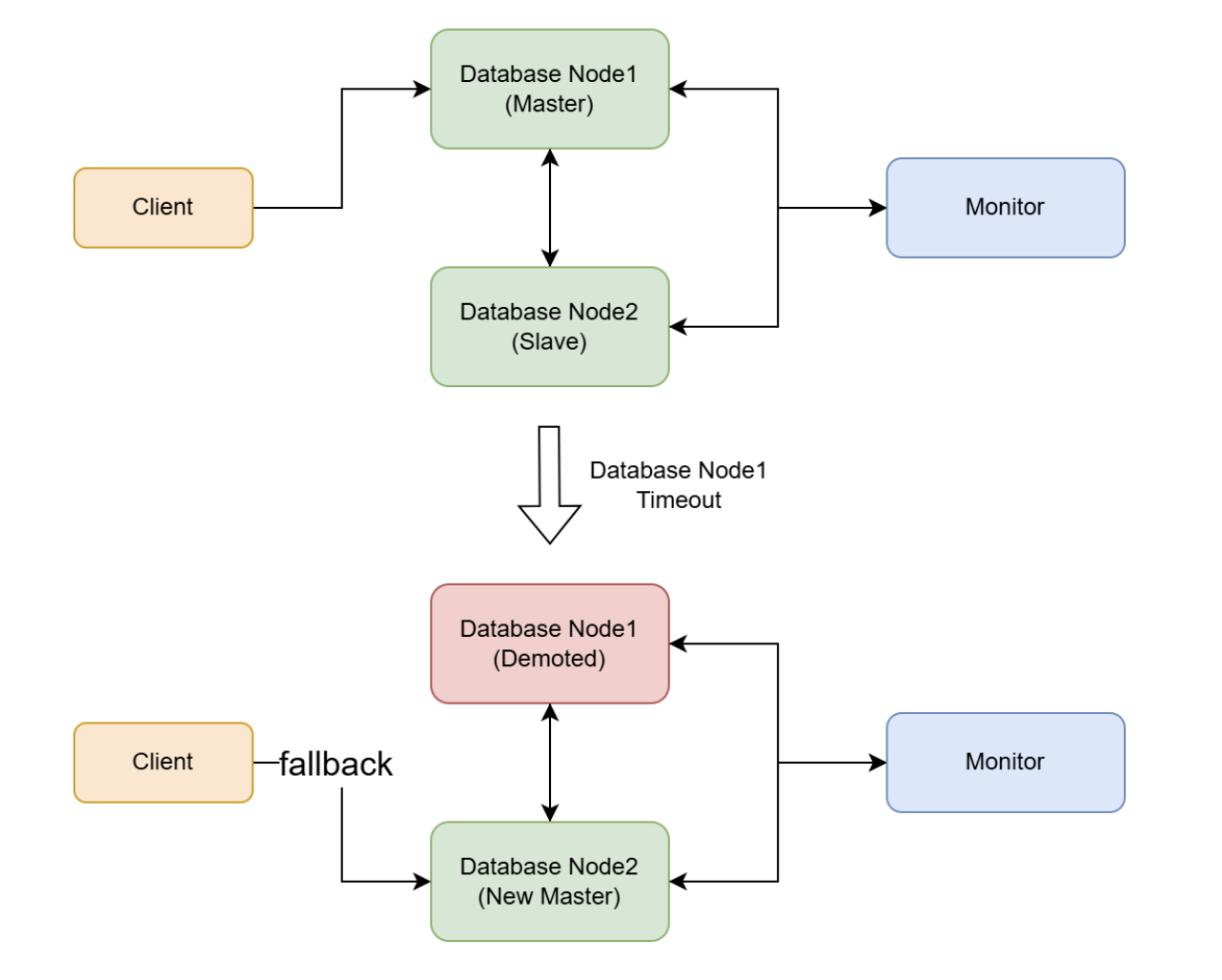
All cluster operations—node install, start/stop, status checks, HBA configuration, monitor node switchover—are performed through a single command-line tool: openresty-edge-db-cluster-manager.sh. The documentation lays out playbooks for realistic failure scenarios—for example, the monitor is down but data nodes are healthy, the monitor and a standby fail together, or the monitor and the primary fail together—with concrete recovery steps for each.
This approach requires a dedicated server for the monitor and full network connectivity among all nodes. The tool documentation states minimum hardware (memory, disk) for each node and should be reviewed before deployment.
The tool supports -y to skip interactive confirmation for automation, but the documentation warns explicitly that it auto-confirms every prompt, including destructive operations—use it with extreme caution.
Backup vs. replication vs. failover: which do you need?
Taken together with the database-wipe incident above, the takeaway is clear: primary–standby replication and automatic clustering (hot standby) handle hardware failures well and keep the business highly available, yet they offer no protection against misoperation or malicious destruction—destructive statements such as DROP DATABASE replicate almost instantly, so primary and standbys are wiped out together.
Scheduled backups (cold backup) are therefore the non-negotiable baseline that no high-availability architecture can replace. The table below contrasts the three approaches on key dimensions:
| Dimension | Scheduled backups | Streaming replication | Auto-failover cluster |
|---|---|---|---|
| Primary goal | Guard against data loss and enable rollback to a historical state | Address service disruption caused by single-point failure | Reduce reliance on manual work during recovery |
| Recovery speed | Depends on data volume; usually quick (full restore) | Minutes (manual switchover) | Automatic switchover |
| Recovery after unintended deletion | Roll back from historical backups (within backup-interval limits) | Hot standby replicates deletes and other changes; replication alone cannot recover | Same as streaming: hot standby syncs mistaken deletes; historical backups still required |
| Failover mode | Manual | Manual | Automatic |
| Extra resources | Disk space + remote host | One standby server | Monitor node + at least one standby |
| Operational complexity | Low | Medium | Medium–high |
| Typical use | All environments (mandatory) | Production environments that require service continuity | Mission-critical workloads with the most demanding availability requirements |
Selection guidance: The first layer is mandatory for every OpenResty Edge deployment, regardless of scale. The second is recommended for all production environments. The third suits mission-critical scenarios with strict requirements on recovery time and human intervention. Where conditions allow, deploying all three layers together provides the most complete data protection coverage.
Summary
Database backup is a basic indicator of how mature your operations practice is, and the cost of setting it up is far lower than the cost of recovering after data loss. As the PocketOS incident illustrates, the hardest lesson was not only losing the primary database but keeping backups inside the same blast radius as production, which collapses the entire line of defense. For OpenResty Edge in production, adopt the following as operational norms:
- Schedule backups for the Edge Admin DB (mandatory); back up the Edge Log Server DB depending on how important its logs and metrics are to you
- Put backup directories on different physical disks than the database (avoid single physical failure domain)
- Enable remote sync so backups have an off-host copy (avoid losing everything on one volume or in one facility)
- Periodically verify backup jobs and file integrity
- Practice restores regularly in non-production
References
To configure database backups, consult the official documentation:
For high-availability database configuration, see also:
- Configure OpenResty Edge DB HA with the interactive script
- OpenResty Edge HA database cluster manager
Frequently asked questions
Is database replication the same as a backup?
No. Streaming replication keeps a live standby in sync with the primary so you can survive a hardware failure, but it copies every change—including an accidental DROP DATABASE or a bad UPDATE—to the standby almost instantly. A backup is a historical snapshot you can restore from; replication has no history to roll back to. Use both: replication for availability, backups for recovery.
Can streaming replication recover from an accidental DROP DATABASE?
No. Because replication forwards every statement to the standby, a destructive command like DROP DATABASE wipes the primary and all standbys together. The only way back is a scheduled backup taken before the deletion. This is why OpenResty Edge treats off-host scheduled backups as a mandatory baseline even when replication or automatic failover is in place.
Where should OpenResty Edge database backups be stored?
On a different physical disk than the database, and ideally on a different host. If backups share a disk or volume with the live data, a single disk failure—or a wipe that reaches the whole volume—destroys both at once. The backup scripts can write locally and then sync off-host with rsync; enabling that remote copy is strongly recommended.
How fast can OpenResty Edge recover after a database failure?
It depends on the data volume. The Edge Admin DB is usually small, so a full restore from a scheduled backup is often quick rather than a matter of hours. The Edge Admin is briefly offline during the restore, but the gateway nodes (Edge Nodes) keep serving traffic on their last published configuration, so end users are unaffected. If streaming replication is in place, promoting a standby finishes in minutes, though the switchover is manual. An automatic failover cluster promotes a healthy standby with no human intervention, driven by a dedicated monitor node.
Which OpenResty Edge databases need to be backed up?
The one that really matters is the Edge Admin DB, which stores all application and gateway configuration—this is the core database you must back up. The Edge Log Server DB holds observability data (logs and statistical metrics) whose importance varies from customer to customer; if that data is not critical for you, you can choose not to back it up. OpenResty Edge ships dedicated backup scripts for both, and you can schedule them with crontab for unattended periodic backups.
What is OpenResty Edge
OpenResty Edge is our all-in-one gateway software for microservices and distributed traffic architectures, developed entirely in-house. It combines traffic management, private CDN construction, API gateway capabilities, security, and more so you can build, operate, and protect modern applications with less friction. OpenResty Edge delivers industry-leading performance and scalability for demanding high-concurrency, high-load scenarios. It can schedule traffic for containerized applications such as Kubernetes clusters and manage large domain portfolios, meeting the needs of large sites and complex applications.
About The Author
Yichun Zhang (GitHub handle: agentzh) is the original creator of the OpenResty® open-source project and the CEO of OpenResty Inc..
Born in Jiangsu, China, and now based in the San Francisco Bay Area, Yichun is among the earliest advocates and leaders of open-source technology and culture in China. He has worked at internationally renowned technology companies, including Cloudflare, Yahoo!, and Alibaba. He is a pioneer in “edge computing”, “dynamic tracing”, and “machine coding”, with more than 22 years of programming experience and 16 years in open source. As the leader of OpenResty®—a project on which more than 40 million domains worldwide rely—he founded OpenResty Inc., a technology company in the heart of Silicon Valley, on that open-source foundation. Its flagship offerings, OpenResty XRay (a non-invasive analysis and troubleshooting tool that uses dynamic tracing) and OpenResty Edge (a full-featured gateway for microservices and distributed traffic), are widely adopted by listed companies and large enterprises around the world.
As an avid open-source contributor, Yichun has contributed more than a million lines of code to numerous open-source projects, including Linux kernel, Nginx, LuaJIT, GDB, SystemTap, LLVM, Perl, etc. He has also authored more than 60 open-source software libraries.
Related Articles
OpenResty XRay Jul 20, 2026

OpenResty XRay Jul 8, 2026

OpenResty XRay May 18, 2026

OpenResty XRay May 8, 2026

OpenResty XRay Apr 23, 2026