
SSL Certificate Automation with the ACME Protocol in OpenResty Edge
SSL certificate automation uses the ACME protocol (RFC 8555) to request, validate, install, and renew TLS certificates without human intervention. With certificate lifetimes shrinking from 200 days in 2026 to just 47 days by 2029, manual renewal is no longer practical. OpenResty Edge builds ACME automation directly into the gateway: it issues and renews certificates — including wildcard and multi-domain — from Let’s Encrypt, ZeroSSL, and any other ACME-compliant CA, public or self-hosted, with no separate ACME client to deploy.
This article explains how the ACME protocol works, why automatic SSL certificate renewal has become essential, and how to set it up in OpenResty Edge in a few clicks.
What Is the ACME Protocol?
ACME (Automated Certificate Management Environment) is an open IETF standard, defined in RFC 8555, that specifies how a client and a certificate authority (CA) communicate to validate domain ownership and issue, renew, and revoke TLS certificates without human interaction. Originally created for Let’s Encrypt, the protocol is now supported by most public CAs.
OpenResty Edge implements the core functionalities of the ACME protocol. It supports automated certificate management and issuance, empowering users to manage the certificate lifecycle of large-scale sites in a more flexible and secure manner.
OpenResty Edge provides:
- Automated Certificate Application and Renewal: Fully automates the entire process of certificate application, validation, and renewal via the ACME protocol.
- Domain Ownership Validation: Supports both HTTP-01 and DNS-01 validation methods.
- ACME Server Interaction and Task Scheduling: Centralized management of certificate issuance tasks, including automatic retries and renewal polling.
- Certificate Storage, Retrieval, and Distribution: The Edge platform features a built-in certificate storage and distribution mechanism, eliminating the need for additional clients.
Why You Need ACME for Automatic Certificate Management
The urgency is industry-wide: the CA/Browser Forum has voted to shorten maximum certificate lifetimes from 200 days in 2026 to 100 days in 2027 and just 47 days by 2029. At that pace, every domain needs eight or more renewals per year — a workload that is only sustainable with automatic SSL certificate renewal.
Historically, OpenResty Edge users typically configured SSL/TLS certificates in two ways: manually uploading them, or relying on Let’s Encrypt (LE) for automatic issuance. Both approaches presented significant limitations:
- Let’s Encrypt Rate Limits: Issuance frequency is restricted per account or per domain.
- Limited Certificate Sources: Inability to support the requirements of multiple issuers or internal enterprise CAs.
- Complex Management: Certificate updates were often error-prone in multi-tenant, multi-domain environments.
The ACME protocol for certificate management offers a powerful solution:
- Overcome LE Limitations: Supports multiple issuers and multi-account configurations, easily handling issuance frequency restrictions.
- Flexible CA Selection: Beyond Let’s Encrypt, choose from ZeroSSL or even your own self-hosted ACME services.
- Integrated Management: Centralized certificate viewing, distribution, and updates directly within the Edge platform, significantly reducing operational burden.
How to Set Up Automatic SSL Certificate Issuance and Renewal in OpenResty Edge
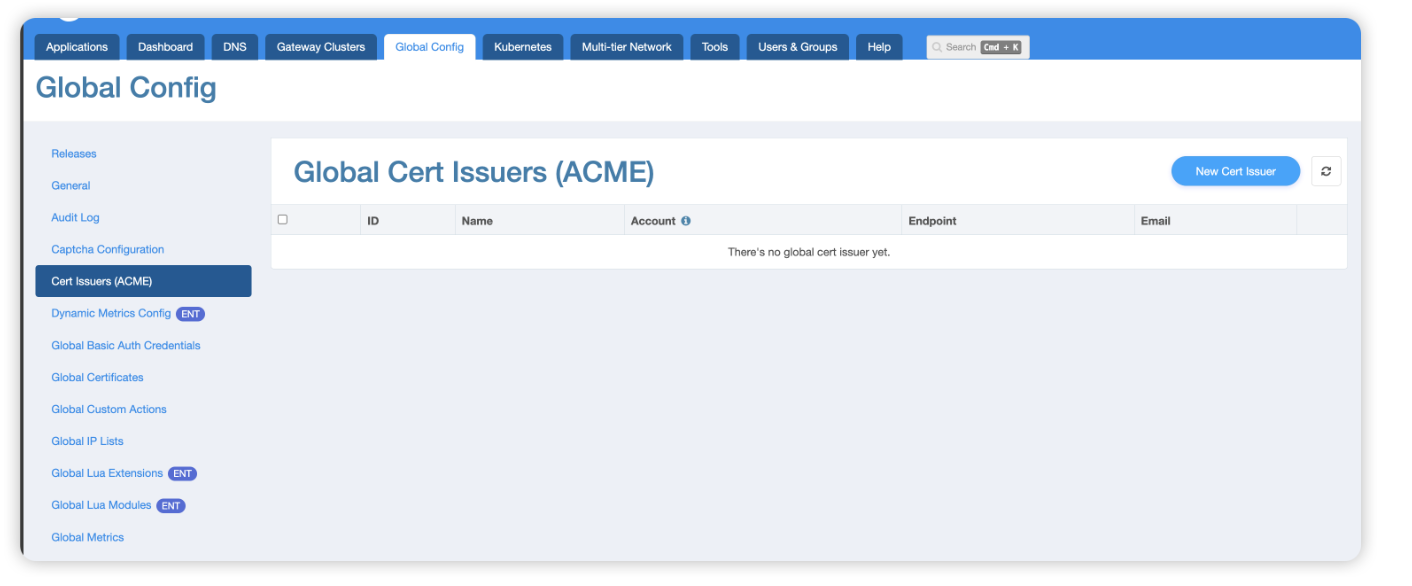
First, in the certificate issuer settings on the global configuration page, add the certificate issuer information.
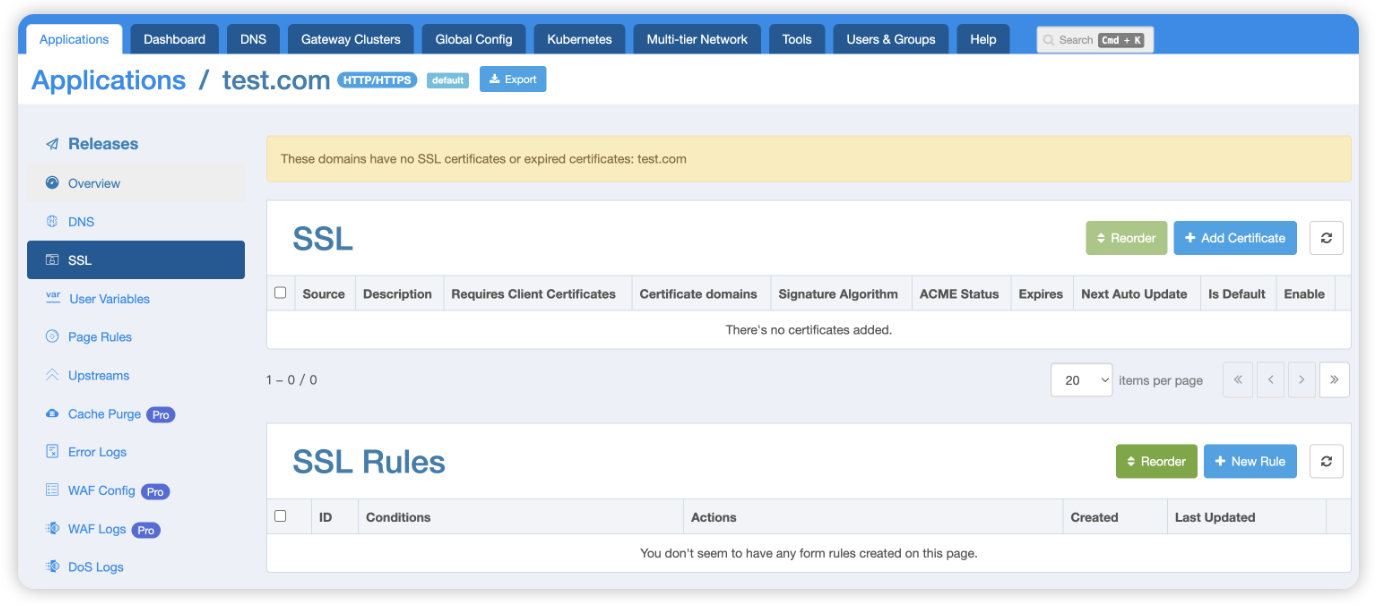
Then, on the application’s SSL page, choose to apply a global certificate for the entire application, or add a specific SSL certificate for the application by clicking the “Add Certificate” button.
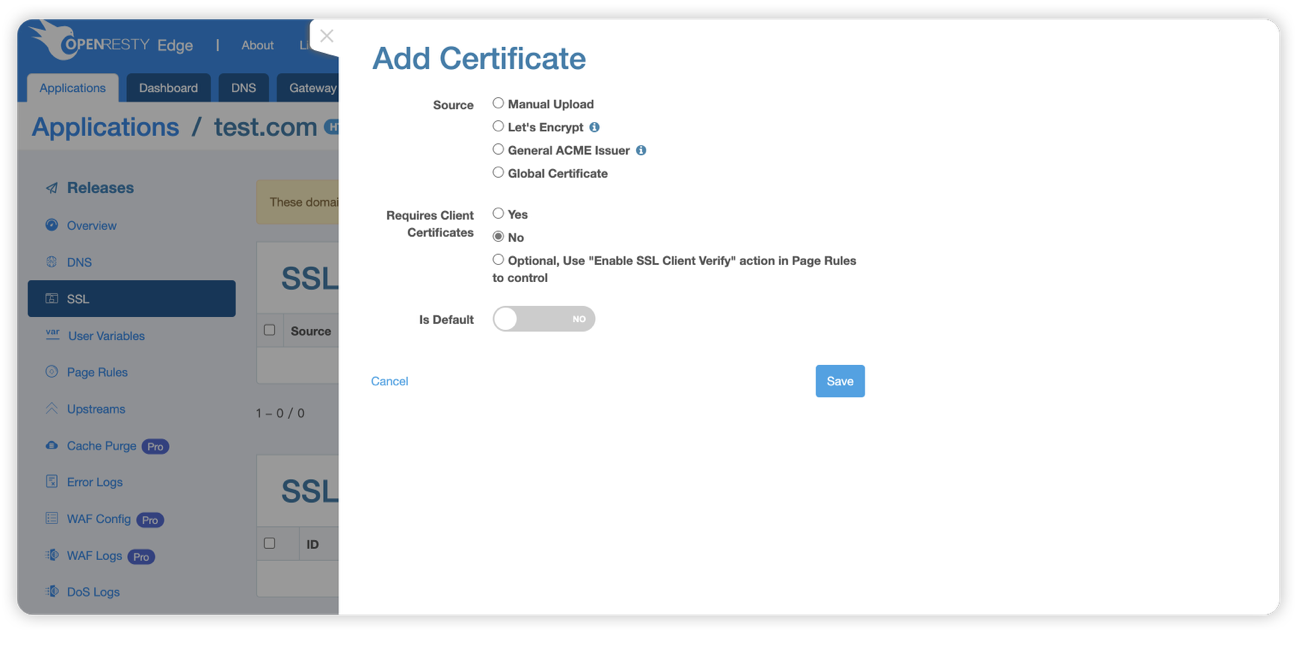
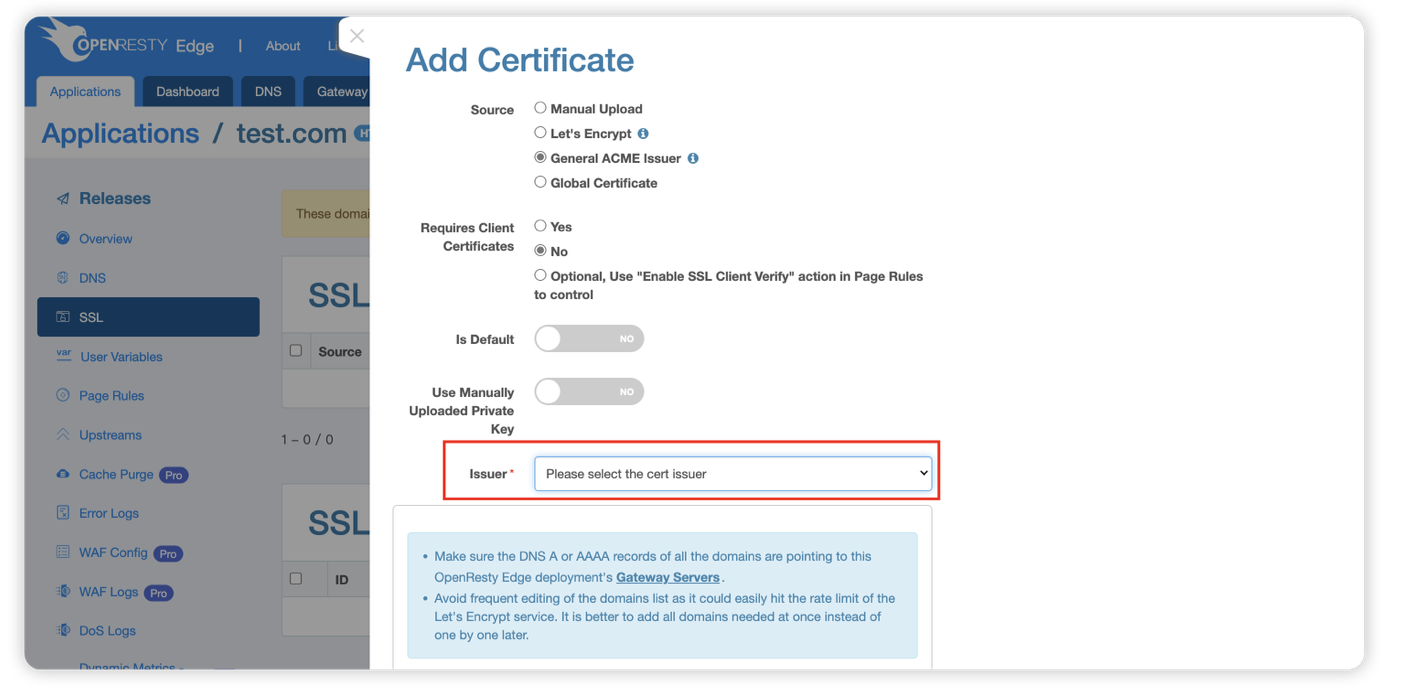
After clicking the “Add Certificate” button, select one of the ACME-compliant certificate issuers you configured in the previous step to generate the certificate.
Before issuing the certificate, make sure your domain’s DNS resolves correctly and points to your Edge Node gateway server. Edge then completes domain validation and certificate issuance automatically.
You can also learn how to configure multiple ACME certificates for the same domain name. For specific steps, please refer to: In-app Certificates
Once your certificate is issued, redirect HTTP to HTTPS with a 301 page rule to enforce SSL across the whole site.
If you want to upload certificates using other methods, you can refer to:
- Automatically issue certificates using the Let’s Encrypt client
- Manually upload SSL certificates in the Edge console
FAQ: SSL Certificate Automation
Does ACME support wildcard certificates?
Yes. Wildcard certificates require the DNS-01 validation method, which OpenResty Edge supports alongside HTTP-01. Once configured, Edge automatically issues and renews wildcard and multi-domain certificates through ACME-compatible CAs.
How does automatic SSL certificate renewal work in OpenResty Edge?
Edge schedules certificate tasks centrally: it polls for upcoming expirations, renews certificates before they expire, and retries automatically on failure. Renewed certificates are stored and distributed to gateway nodes by the built-in mechanism, so no external ACME client or cron job is required.
Can automated and manually uploaded certificates coexist?
Yes. ACME-automated certificates can be managed alongside manually uploaded ones in the same Edge console, without affecting existing deployments.
What happens if a certificate renewal fails?
Edge starts renewing a certificate about 30 days before it expires, so a failed attempt does not interrupt service — the current certificate stays active while Edge retries automatically. You can also trigger a re-issuance manually from the console.
What is OpenResty Edge
OpenResty Edge is our all-in-one gateway software for microservices and distributed traffic architectures. It combines traffic management, private CDN construction, API gateway, security, and more to help you easily build, manage, and protect modern applications. OpenResty Edge delivers industry-leading performance and scalability to meet the demanding needs of high concurrency, high load scenarios. It supports scheduling containerized application traffic such as K8s and manages massive domains, making it easy to meet the needs of large websites and complex applications.
→ Certificate automation is one of many operational burdens the platform removes — the rest are covered in What Is OpenResty Edge and in the open-source vs. enterprise comparison.
→ Related: if you need to route TLS traffic by hostname without terminating it at the gateway, see Configuring SNI proxies in OpenResty Edge.
About The Author
Yichun Zhang (Github handle: agentzh), is the original creator of the OpenResty® open-source project and the CEO of OpenResty Inc..
Yichun is one of the earliest advocates and leaders of “open-source technology”. He worked at many internationally renowned tech companies, such as Cloudflare, Yahoo!. He is a pioneer of “edge computing”, “dynamic tracing” and “machine coding”, with over 22 years of programming and 16 years of open source experience. Yichun is well-known in the open-source space as the project leader of OpenResty®, adopted by more than 40 million global website domains.
OpenResty Inc., the enterprise software start-up founded by Yichun in 2017, has customers from some of the biggest companies in the world. Its flagship product, OpenResty XRay, is a non-invasive profiling and troubleshooting tool that significantly enhances and utilizes dynamic tracing technology. And its OpenResty Edge product is a powerful distributed traffic management and private CDN software product.
As an avid open-source contributor, Yichun has contributed more than a million lines of code to numerous open-source projects, including Linux kernel, Nginx, LuaJIT, GDB, SystemTap, LLVM, Perl, etc. He has also authored more than 60 open-source software libraries.
Related Articles
OpenResty XRay Jun 29, 2021

OpenResty XRay Jun 25, 2021

OpenResty XRay May 27, 2021

OpenResty XRay Dec 15, 2025

OpenResty XRay Dec 3, 2025